
The below steps are to be completed once you have connected to Metabolic Balance, if you are not connected - please click here.
Once connected, the first thing you will want to set up is all the Metabolic Balance forms.
These are accessed from Content -> Forms -> Add -> Load Form Library.
All Forms will be available to load into your form library. These will need to be selected and saved individually.
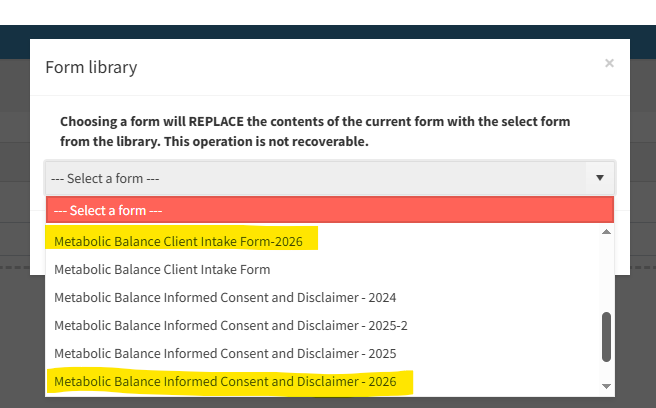
Select the two forms highlighted below:
- Metabolic Balance Client Intake Form-2026
- Metabolic Balance Informed Consent and Disclaimer - 2026
Please also remember to add the new form links into your booking confirmation and reminder email messages for Metabolic Balance patients. Insert Form Link into Booking and Reminder Emails video
A quick video on doing that is below: